Notifications#
- On the top right corner, you have a bell-shaped icon, representing the notifications:

The small orange box with the number inside represents your total notifications.
Click on notifications icon to reveal the list of notifications.
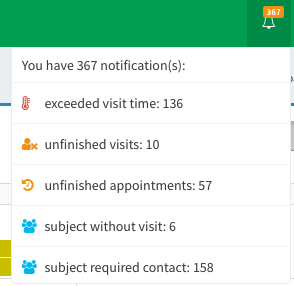
- There are particular kinds of the notifications:
| Notification | Description |
|---|---|
| Approaching visits | The planned visit is approaching. |
| Exceeded visit time | The visit’s period is exceeded. |
| Post mail for approaching visits | You need to send a reminder to a patient about the upcoming visit. |
| Subject required contact | You need to reach out the patient with the information about a upcoming visit. |
| Subject vouchers almost expired | Informs that a subject’s vouchers are expiring. |
| Subject without visit | Informs that the patient does not have a scheduled visit. |
| Unfinished appointment | You need to set the appointment’s status as finished. |
| Unfinished visits | You need to clarify the visit’s status (mark as finished/cancelled/edited). |
| Visits with missing appointments | There is a visit with no scheduled appointment. |
| Inconsistent RED Cap subject | There is inconsistency between SMASCH and RedCap records, reach out to SMASCH Developers. |
| Missing RED Cap subject | There is inconsistency between SMASCH and RedCap records, reach out to SMASCH Developers. |
To clear out the notification#
The notifications in the top right corner will disappear when the issue they inform about will be resolved.
Example: How to clear out the notification Subject without visit? If the patient does not have a planned visit, you get the notification: Subject without visit. Therefore you have to add a new visit for that patient.