Configuration#
Configuration is separated into 3 different places:
/etc/smasch/smasch.pyconfig file - this contains all required parameters to run smasch properly, changes require smasch restart- General configuration in the UI - contains global smasch configuration that does not require restart of smasch
- Study configuration in the UI - contains study related configuration options
System configuration in /etc/smasch/smasch.py#
SECRET_KEY- long random string used for cryptographic signing, and should be set to a unique, unpredictable value.
SECRET_KEY = 'L,C2Vgp7kn4\]adyV6R:?.,K/!D&X$}N'SERVE_STATIC- True/False value defining if smasch should server static files. In heavy used production machines it’s recommended that static files are served directly via nginx/apache
SERVE_STATIC = TrueSTATIC_ROOT- folder where static files (js, css, etc) are stored, example:
STATIC_ROOT = '/usr/lib/smasch/data/static'MEDIA_ROOT- folder where uploaded media files are stored (like language images)
MEDIA_ROOT = '/usr/lib/smasch/data/media'UPLOAD_ROOT- folder where patient specific files are stored
UPLOAD_ROOT = '/usr/lib/smasch/data/upload'ETL_ROOT- folder where automatic ETL files should be stored. Automatic ETL would allow for daily import/export to csv format.
ETL_ROOT = '/usr/lib/smasch/data/etl'LOGGING- definition of loggers used by smasch
LOGGING = {
  'version': 1,
  'disable_existing_loggers': False,
  'handlers': {
    'file': {
      'level': 'INFO',
      'class': 'logging.FileHandler',
      'filename': '/var/log/smasch/smasch.log',
      'formatter': 'verbose'
    },
    'console': {
      'class': 'logging.StreamHandler',
      'level': 'DEBUG',
      'formatter': 'simple'
    },
  },
  'formatters': {
    'verbose': {
      'format': '%(levelname)s %(asctime)s %(module)s %(process)d %(thread)d %(message)s'
    },
    'simple': {
      'format': '%(levelname)s %(message)s'
    },
  },
  'loggers': {
    'django': {
      'handlers': ['file'],
      'level': 'INFO',
    },
    'web': {
      'handlers': ['file'],
      'level': 'DEBUG',
    },
  },
}TWO_FACTOR_SMS_GATEWAY- engine used for Two-Factor Authentication. Currently, the only supported engine is NEXMO (web.nexmo_gateway.Nexmo).
TWO_FACTOR_SMS_GATEWAY = "web.nexmo_gateway.Nexmo"FORCE_2FA- True/False defining if Two-Factor Authentication is obligatory.
FORCE_2FA = TrueNPM_ROOT_PATH- absolute root path of smasch
NPM_ROOT_PATH = '/usr/lib/smasch/'MESSAGE_STORAGE- defines how messages to the UI are sent. By default, messages are sent using cookies ('django.contrib.messages.storage.cookie.CookieStorage'). However, if there is a problem with cookies you can change it to session.
MESSAGE_STORAGE = 'django.contrib.messages.storage.session.SessionStorage'DEBUG- True/False defines if debug information should be provided. It should be used only in development/debugging process (provided information might be confidential).
DEBUG = FalseALLOWED_HOSTS- list of allowed host. If your smasch instance is going to be accessed by https://example.com/ url you need to addexample.comhere.
ALLOWED_HOSTS = ['127.0.0.1', 'localhost', 'example.com']EMAIL_HOST- SMTP server.
EMAIL_HOST = 'smtp.gmail.com'EMAIL_HOST_USER- SMTP user.
EMAIL_HOST_USER = 'your_account@gmail.com'EMAIL_HOST_PASSWORD- SMTP user password
EMAIL_HOST_PASSWORD = 'your account’s password'EMAIL_PORT- SMTP port
EMAIL_PORT = 587EMAIL_USE_TLS- use TLS when connecting to SMTP server
EMAIL_USE_TLS = TrueEMAIL_USE_SSL- use SSL when connecting to SMTP server
EMAIL_USE_SSL = TrueEMAIL_BACKEND- specifies the backend that will work with the host email server. For SMTP server it should be set todjango.core.mail.backends.smtp.EmailBackend
EMAIL_BACKEND = 'django.core.mail.backends.smtp.EmailBackend'General configuration in the UI#
Go to left panel subcategory General in Configuration. Change the Value field and click corresponding Save button for each change you made.
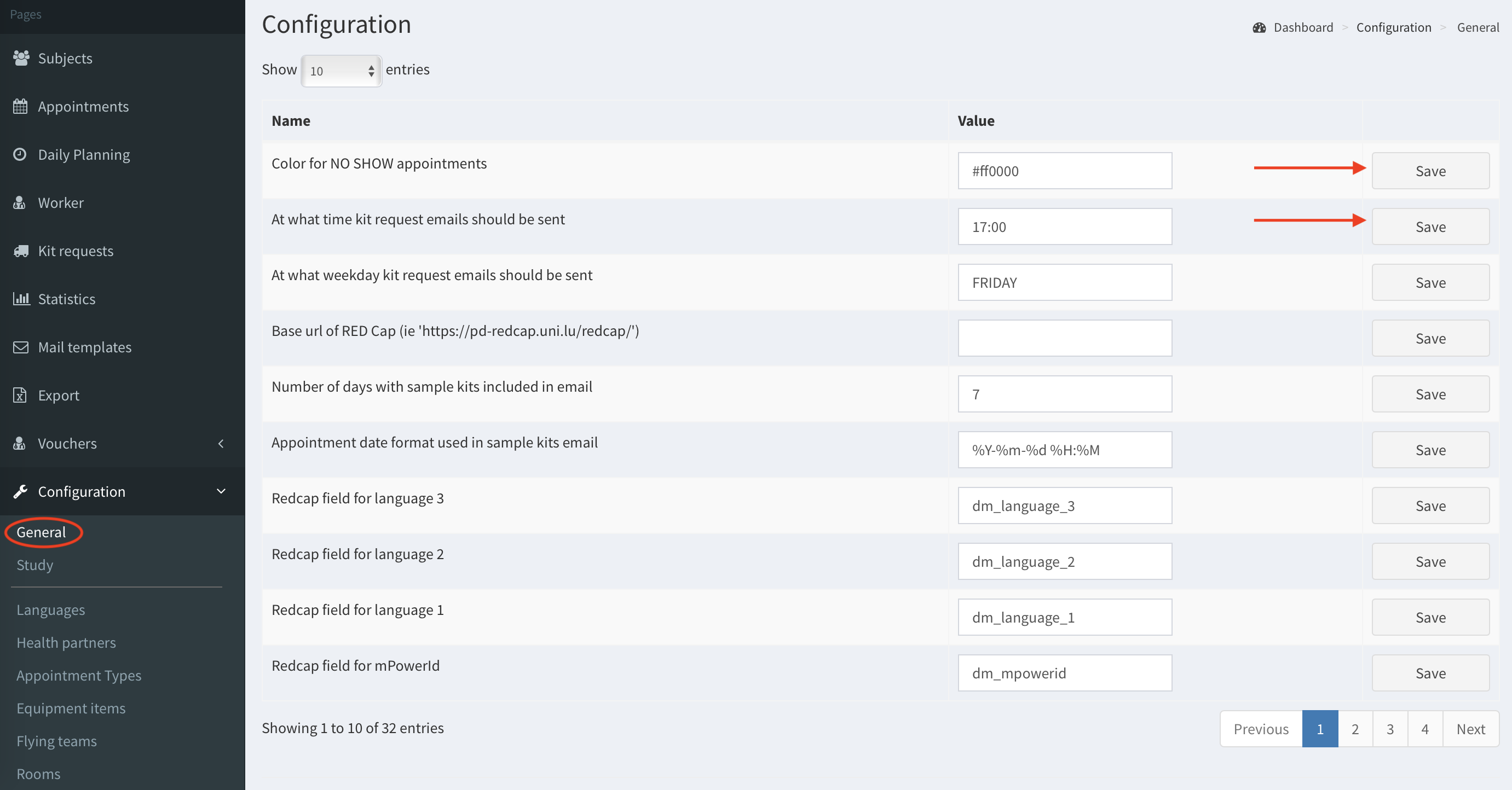 {:style=“display:block;margin-top:10px;”}
The table below contains explanation of the configurable parameters. The descriptions are grouped as per feature - not following the order displayed in the list at Configuration general page.
Note: Passwords/API tokens are not visible - you can only write the value, but cannot read it.
| NAME | DESCRIPTION | EXAMPLE |
|---|---|---|
| COLORS settings | ||
| Color for cancelled appointments | RGB value of the color that should be used to visualize cancelled appointments in calendar view. | #00ff00 |
| Color for NO SHOW appointments | RGB value of the color that should be used to visualize appointments marked as NO SHOW in calendar view (patient did not show up). | #00ff00 |
| KIT REQUEST EMAIL settings | ||
| At what time kit request emails should be sent | At what time the email with upcoming appointments should be sent. | 17:00 |
| At what weekday kit request emails should be sent | At what days of week the email with upcoming appointments should be sent. | FRIDAY |
| Appointment date format used in sample kits email | Format used in the email with upcoming appointments (regex pattern) | %Y-%m-%d %H:%M |
| At what time a day email with updates about virus tests should be sent | Time; if field is empty - no email is sent. The email is sent to all workers with email address provided. | 17:00 |
| Number of days with sample kits included in email | For how many days should the list with upcoming appointments be created. | 7 |
| Recipients of kit requests email | Semicolon separated list of email addresses that should receive email with upcoming appointments. | kit.receipents@kit.lu; with.semicolon@separation.lu |
| RED Cap settings | ||
| API Token for RED Cap integration | API tokens are not visible (keep in mind that this value is never presented to the frontend, so you can modify it, but you cannot see the value in the interface). | |
| Base url of RED Cap |
https://pd-redcap.uni.lu/redcap/
|
|
| Redcap field for birth date | cdisc_dm_brthdtc | |
| Redcap field for deceased | dm_death | |
| Redcap field for IgA status in the visit | ||
| Redcap field for IgG status in the visit | ||
| Redcap field for language 1 | dm_language_1 | |
| Redcap field for language 2 | dm_language_2 | |
| Redcap field for language 3 | dm_language_3 | |
| Redcap field for language 4 | dm_language_4 | |
| Redcap field for mPowerId | dm_mpowerid | |
| Redcap field for sample date in the visit | ||
| Redcap field for sample kit id in the visit | ||
| Redcap field for sex | cdisc_dm_sex | |
| Redcap field for subject id | cdisc_dm_usubjd | |
| Redcap field for virus test result | ||
| 2FA settings | ||
| NEXMO API KEY | When Two-Factor Authentication is enabled this field contains NEXMO API KEY (keep in mind that this value is never presented to the frontend, so you can modify it, but you cannot see the value in the interface). | 123452ab |
| NEXMO API SECRET | When Two-Factor Authentication is enabled this field contains NEXMO API SECRET (keep in mind that this value is never presented to the frontend, so you can modify it, but you cannot see the value in the interface). | 1234567890abcdef |
| The sender of the message from NEXMO (phone number or text) | When Two-Factor Authentication is enabled this field defines what should be the phone number/name of the text message sent from the system. | SMASCH |
| MISCELLANEOUS | ||
| Default email address used in the from field when sending emails | The name of sender of the email | ncer-pd-scheduler@uni.lu |
| Path to a static file containing background image, used in login.html | Path | /file.jpg |
| Should visit numbers be shown starting in 0 | The number of first visit displayed in Subjects list | True/False |
| Type of appointment assigned to imported visits | ||
| User that should be assigned to changes introduced by importer | ||
Two-Factor Authentication#
Smasch supports Two-Factor Authentication without any configuration. Users can enable it by clicking Security in the user profile:
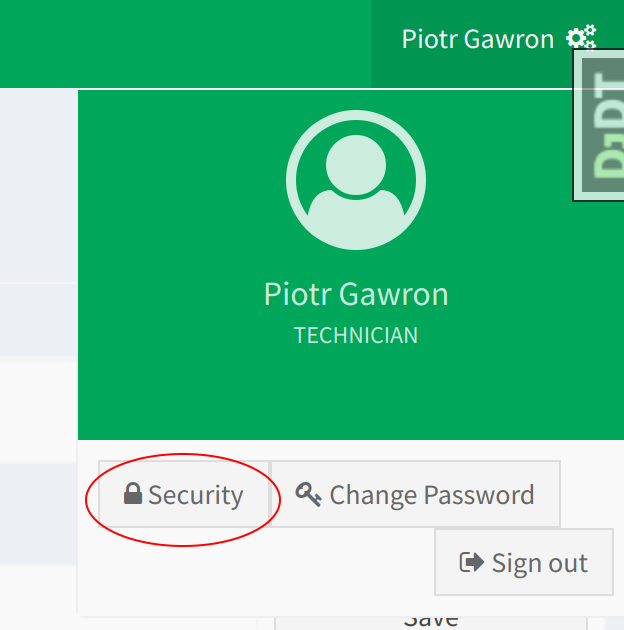 {:style=“display:block;width:200px”}
This allows to use Token generator as a 2FA provider.
Additionally, there is possibility to use NEXMO for sending text messages. To enable it you must provide NEXMO API KEY and API SECRET in the global configuration. You can also specify phone number or name that will appear in the sent messages.
To make 2FA obligatory you need to set FORCE_2FA = True in /etc/smasch/smasch.py file.